
How to Manage Tasks Effectively Using Digital Productivity Tools
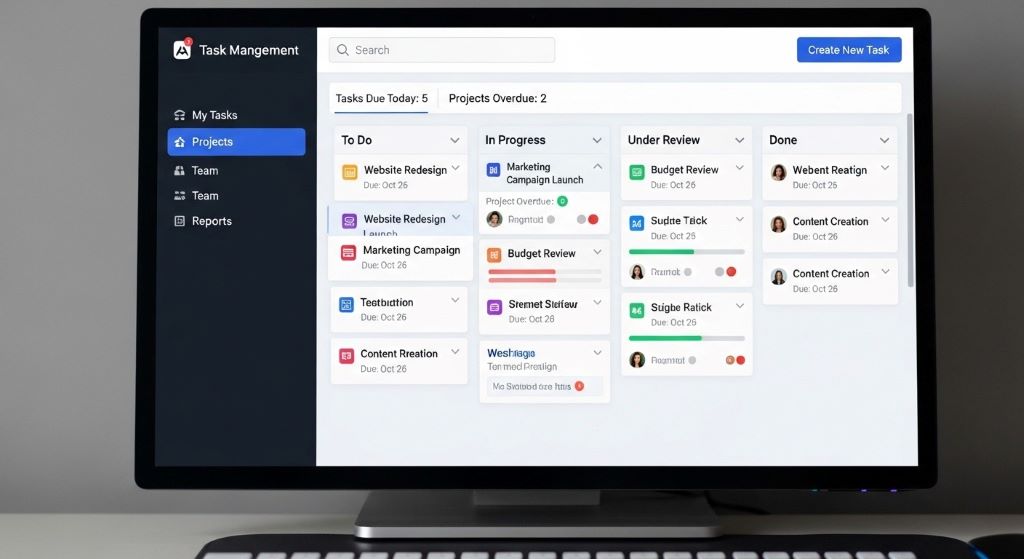
Managing multiple tasks simultaneously has become a universal challenge in our fast-paced world. Whether you’re juggling work projects, personal commitments, or long-term goals, keeping everything organized can feel overwhelming. Fortunately, digital tools have revolutionized how we approach task management, making it easier than ever to stay on top of our responsibilities.
The key to effective task management isn’t just about having the right tools. It’s about understanding how to use them strategically to create systems that actually work for your unique situation. This guide will walk you through practical strategies for leveraging digital solutions to boost your productivity and reduce stress.
By implementing the techniques covered in this article, you’ll learn how to capture tasks efficiently, prioritize what matters most, and maintain momentum on your projects. Additionally, you’ll discover how to avoid common pitfalls that prevent people from getting the most out of their digital tools.
Understanding Your Task Management Needs
Before diving into specific tools and techniques, you need to assess your personal situation. Everyone’s task management requirements differ based on their work style, responsibilities, and preferences. Taking time to understand your needs prevents you from wasting effort on systems that don’t match your reality.
Start by analyzing the types of tasks you handle regularly. Some people manage primarily short-term assignments that get completed within days. Others juggle long-term projects spanning weeks or months. Many individuals deal with a mixture of both, requiring flexible systems that accommodate different time scales.
Consider how you naturally think about work. Some people thrive with detailed plans and structured schedules. Others prefer flexible approaches that adapt throughout the day. Neither style is inherently better, but your tools should align with your preferences rather than fighting against them.
Think about your collaboration needs as well. If you work extensively with teams, you’ll need features that facilitate sharing and coordination. Solo workers might prioritize different capabilities like deep focus tools or personal analytics.
Choosing the Right Digital Tools
The market offers countless options for digital task management, from simple to-do lists to comprehensive project management platforms. However, more features don’t automatically mean better results. The ideal tool balances capability with simplicity, providing what you need without unnecessary complexity.
Task tracking software comes in various forms, each designed for different use cases. Basic apps focus on simple list-making with minimal features. Mid-range options add capabilities like due dates, priorities, and categories. Advanced platforms include project timelines, resource allocation, and team collaboration features.
When evaluating options, start with free versions or trials. Testing tools in your actual workflow reveals whether they’ll genuinely help or just add another layer of complexity. Pay attention to how intuitive the interface feels and whether the learning curve seems manageable.
Integration capabilities matter significantly in today’s connected world. Your task manager should work smoothly with your calendar, email, and other tools you use daily. Seamless integration reduces friction and makes it more likely you’ll consistently use the system.
Mobile accessibility has become essential for most people. You need to capture tasks and check your list wherever you are. Therefore, choose tools with robust mobile apps that sync reliably across all your devices.
Setting Up Your Foundation
Once you’ve selected your tools, proper setup determines whether your system succeeds or fails. Many people jump in without adequate planning, leading to disorganized systems that eventually collapse. Investing time upfront to establish solid foundations pays dividends long-term.
Create clear categories or projects that reflect how you think about your work. These might be based on life areas like work, personal, health, and family. Alternatively, you might organize by project names or client accounts. The structure should feel natural and make it easy to find what you need quickly.
Establish consistent naming conventions for tasks and projects. This consistency helps you scan lists quickly and find items efficiently. For example, starting action items with verbs makes them instantly recognizable as tasks rather than notes or references.
Set up templates for recurring processes you handle regularly. If you follow similar steps for certain types of projects, creating templates saves time and ensures you don’t forget important steps. Templates also make it easier to delegate work since the process is documented.
Configure notification settings thoughtfully. Too many alerts create noise that you’ll eventually ignore. Too few means you might miss important deadlines. Find the balance that keeps you informed without becoming overwhelming.
Capturing Tasks Efficiently
One of the biggest benefits of productivity systems is having a reliable place to capture everything that needs attention. When tasks live only in your head, they create mental clutter and anxiety. Externalizing them frees mental space for actual work.
Develop the habit of immediately capturing tasks as they arise. When someone emails you a request, turn it into a task right away rather than leaving it in your inbox. When you think of something during a meeting, add it to your system immediately.
Use quick capture features available in most work planning apps. These allow you to add tasks with minimal friction, often just typing a few words. You can add details and categorization later during dedicated processing time.
Embrace the two-minute rule for small tasks. If something takes less than two minutes, do it immediately rather than adding it to your system. This prevents your task list from filling with trivial items that create visual clutter.
Process your capture inbox regularly, ideally daily. During processing, add necessary details like due dates, priorities, and context. This keeps your main task lists clean and actionable rather than cluttered with half-formed ideas.
Prioritizing What Matters Most
Having a comprehensive list of tasks means nothing if you can’t identify what deserves your attention now. Effective prioritization separates productive people from those who stay perpetually busy without making real progress.
Use priority levels sparingly to maintain their meaning. When everything is high priority, nothing truly is. Limit yourself to marking only genuinely urgent and important items as high priority. This makes those tags meaningful when you see them.
Consider implementing time-blocking alongside your task list. Allocating specific time slots for tasks makes them more concrete and helps you estimate whether your plan is realistic. Additionally, time-blocking prevents the illusion of infinite time that leads to overcommitment.
Review and adjust priorities regularly as circumstances change. What was important yesterday might be less critical today based on new information or shifting deadlines. Regular reviews keep your focus aligned with current reality.
Apply the Eisenhower Matrix concept by distinguishing between urgent and important tasks. Focus on important but not urgent items to prevent them from becoming crises. This proactive approach reduces stress and improves overall outcomes.
Learn to recognize and eliminate low-value tasks that drain time without providing meaningful results. Not everything that could be done should be done. Sometimes the most productive decision is removing tasks entirely rather than just postponing them.

Creating Effective Workflows
Individual tasks rarely exist in isolation. They’re usually parts of larger projects or recurring processes. Building efficient workflows around these patterns multiplies your productivity beyond what better task lists alone can achieve.
Map out the typical steps for projects you handle regularly. Understanding your workflow lets you anticipate what’s coming next rather than constantly figuring out what to do. This preparation reduces decision fatigue and keeps momentum going.
Use checklists for processes with multiple steps that must be completed in sequence. Checklists ensure you don’t skip critical steps even when you’re tired or distracted. They’re particularly valuable for infrequent but important tasks where you might not remember all the details.
Establish clear next actions for all projects. Every project on your list should have at least one clearly defined next physical action you could do right now. Vague entries like “work on presentation” lead to procrastination, while “draft outline for presentation” gives you a clear starting point.
Build review routines into your workflow. Weekly reviews help you step back from daily execution to assess overall progress and adjust plans. These reviews prevent you from working hard on the wrong things or missing important commitments.
Collaborating Through Digital Tools
When working with others, your task management system becomes a communication and coordination platform. Effective collaboration features prevent miscommunication and ensure everyone knows what they’re responsible for and when it’s due.
Assign tasks clearly with specific owners. Shared tasks where everyone is responsible often mean nobody feels accountable. Designate one person as the owner even for collaborative work, giving them coordination responsibility.
Include relevant context and attachments directly with tasks. When team members can find everything they need within the task itself, they don’t waste time searching for information or asking clarifying questions. This self-service approach reduces interruptions.
Use comments and updates to maintain a record of task-related discussions. This creates a searchable history that’s more reliable than scattered email threads or chat messages. Additionally, it keeps conversations connected to the relevant work.
Set up shared views that give team members visibility into relevant work without overwhelming them with everything. Filtered views let people see just their assignments or tasks in their department without the noise of unrelated items.
Establish team conventions for how you’ll use the system together. Agreeing on standards for priorities, due dates, and status updates prevents confusion and makes the tool genuinely useful for coordination rather than just another place to check.
Maintaining Consistency and Momentum
The most sophisticated system becomes worthless if you don’t use it consistently. Building habits around your digital tools transforms them from nice ideas into actual productivity drivers that deliver results.
Start and end each day by reviewing your task list. Morning reviews help you plan your day effectively and identify potential conflicts. Evening reviews let you capture anything new and prepare for tomorrow, allowing you to mentally disconnect from work.
Keep your system current by immediately updating task statuses as you complete work. Stale lists with outdated information erode trust in your system. When you can’t rely on your list being accurate, you stop consulting it.
Schedule regular maintenance sessions to keep your system clean. Archive completed projects, delete irrelevant tasks, and reorganize as your needs evolve. This prevents accumulation of digital clutter that makes the system harder to use.
Track completion rates and reflect on patterns. If you consistently move tasks forward without completing them, you might be overestimating available time or need to break projects into smaller pieces. These patterns provide valuable feedback for improvement.
Celebrate progress by acknowledging completed tasks. Many tools offer satisfaction-inducing completion animations or statistics showing your accomplishments. These small rewards reinforce consistent usage and maintain motivation.
Avoiding Common Pitfalls
Even with the best intentions, certain mistakes can undermine your productivity system. Being aware of these common traps helps you avoid them or recover quickly when you stumble.
Resist the temptation to constantly switch tools searching for the perfect solution. Tool-hopping wastes time and prevents you from developing deep familiarity with any system. Commit to a tool for at least three months before considering alternatives.
Don’t let your task list become a dumping ground for vague ideas and someday-maybe dreams. Maintain separate spaces for active tasks versus future possibilities. Mixing them creates overwhelming lists that discourage you from even looking at the system.
Avoid over-engineering your system with complex categories, tags, and filters that require constant maintenance. Simpler systems you’ll actually use beat sophisticated setups that become burdensome. Add complexity only when clearly solving a specific problem.
Recognize when tasks are really projects requiring multiple steps. Single task entries for complex work lead to procrastination because the action isn’t clear. Break projects down until you have actionable next steps.
Watch for perfectionism that prevents you from starting tasks because the system isn’t perfectly organized first. Your task management exists to support your work, not become work itself. Sometimes you need to just pick something and get started.
Leveraging Advanced Features
Once you’ve mastered the basics, exploring advanced capabilities can unlock additional productivity gains. However, adopt new features gradually rather than trying to use everything at once.
Automation can handle repetitive task creation without manual effort. Set up recurring tasks for regular responsibilities like weekly reports or monthly reviews. Rules can automatically categorize or prioritize tasks based on keywords or other criteria.
Natural language input lets you create tasks by typing phrases like “meeting with Sarah tomorrow at 2pm” and having the system automatically parse the date and time. This speeds up task capture significantly once you learn the syntax.
Dependencies and task relationships help you model complex projects where certain work must finish before other tasks can begin. Visualizing these relationships through Gantt charts or dependency maps helps with planning and coordination.
Time tracking integration shows how long tasks actually take versus your estimates. This data helps improve future planning accuracy and identifies activities that consume disproportionate time relative to their value.
Custom views and filters let you slice your tasks different ways depending on what you need to see. Create views for today’s priorities, tasks by project, items waiting on others, or whatever perspectives help you work effectively.
Integrating With Your Broader Productivity System
Task management doesn’t exist in isolation. It’s one component of a larger productivity system that includes calendar management, note-taking, reference materials, and communication tools. Integration between these elements creates seamless workflows.
Connect your tasks with your calendar so you can see both commitments and available time in one place. This integration prevents overcommitting and helps you schedule realistic work sessions for your priorities.
Link tasks to relevant notes, documents, and resources. When everything related to a project is connected, you avoid wasting time searching across different tools. Bidirectional links work even better, letting you navigate freely between tasks and supporting materials.
Use email integration to convert messages into tasks without switching contexts. Many tools offer features for forwarding emails to create tasks or browser extensions that add tasks from your inbox with one click.
Sync with communication platforms so task updates can post to team channels automatically. This keeps everyone informed without requiring manual status reports and reduces the need for status meetings.
Consider how your task system connects with goal-setting and progress tracking. Tasks should ultimately support larger objectives, and seeing this connection maintains motivation and ensures you’re working on what truly matters.
Conclusion
Managing tasks effectively with digital tools requires more than just downloading an app. It demands thoughtful selection of task tracking software that matches your needs, careful setup of productivity systems that align with how you work, and consistent use of work planning apps to maintain momentum.
The most successful approach combines the right tools with proven techniques for capturing, organizing, and prioritizing your work. Start simple and add complexity only when it solves specific problems you’re experiencing. Remember that the goal isn’t perfect organization but rather completing meaningful work with less stress.
Regular review and maintenance keep your system functioning smoothly over time. Pay attention to what works and adjust what doesn’t. Your needs will evolve, and your system should adapt accordingly.
Ultimately, digital productivity tools amplify your natural abilities rather than replacing good judgment and focus. They provide structure and reliability that free your mind to do its best thinking and problem-solving. By implementing the strategies outlined in this guide, you’ll transform overwhelming task lists into manageable workflows that help you accomplish what matters most.
Frequently Asked Questions
What’s the best task management app for beginners?
For beginners, simple apps like Todoist, Microsoft To Do, or Google Tasks offer excellent starting points. They provide core functionality without overwhelming features. Choose based on which ecosystem you already use. The best app is one you’ll actually use consistently, so prioritize ease of use over advanced capabilities when starting out.
How many tasks should I aim to complete daily?
Quality matters more than quantity. Focus on completing three to five significant tasks daily rather than trying to check off dozens of minor items. This approach ensures you make real progress on priorities. Your capacity depends on task complexity, available time, and energy levels. Track your completion patterns to find your sustainable pace.
Should I use one tool for everything or multiple specialized tools?
Start with one comprehensive tool that handles most needs. Multiple tools create fragmentation and maintenance overhead. However, specialized tools make sense when one app can’t adequately handle a specific requirement. For example, you might use a project management platform for work but a simpler app for personal tasks if they require very different features.
How often should I review and update my task list?
Review your task list daily to plan your day and update statuses. Conduct a more thorough weekly review to assess project progress, adjust priorities, and clean up your system. Monthly reviews help align tasks with broader goals. More frequent reviews waste time, while less frequent ones let your system become stale and unreliable.
What should I do when my task list becomes overwhelming?
When overwhelmed, stop adding new tasks and focus on completion. Perform a ruthless prioritization session, moving non-essential items to a someday list. Break large projects into smaller, actionable steps. Consider whether some tasks should be delegated, delayed, or deleted entirely. Sometimes reducing your commitments is the most productive action you can take.
Related Topics:
FAQ Schema Compression Tactics for Long Pages
Deep-Link Cart Retrieval Emails for Shopify Automation